Provided as a complete architectural framework and Visual Studio solution.
This framework was originally developed around 25 years ago during the era of enterprise systems engineering to solve complex integration challenges—due mostly to 32 to 64 bits conversion back then, as well as attempts to make OLE containers more stable to crashes in components. Since then, the Windows operating system has evolved significantly; however, developers still face persistent hurdles and interest in running 32-bit and 64-bit COM components interchangeably, as well as seamlessly running in-process components out-of-process (or vice versa) to protect container applications from crashes.
The reason for publishing this code now (while I'm still alive and in my right mind) is to share my early architectural experiences with a new generation of developers who might be curious about COM internals, out-of-process/in-process bridging, and legacy Windows interoperability mechanisms.
Note on Naming & History:
This repository is named AXHook to highlight its core interception engine and avoid confusion with the .NETSystem.Windows.Forms.AxHostclass. However, you will notice the internal source files, solutions, and namespaces are heavily built around the original project nameAXHost(stemming from the "ActiveXout" architecture that allowed GUI out-of-process servers like Word, Excel, and IE to run "visually" inside ActiveX Containers). This code was written long before Microsoft released the first version of .NET in 2002.
To preserve the historical integrity of the project (and the sanity of the build pipeline), the original AXHost project structure and C++ namespaces have been left exactly as they were written more than two decades ago.
The only modernizations made to this codebase were the minimal adaptations required to achieve a clean, zero-error build on the modern Visual Studio Insiders (2026 v145 toolchain), alongside basic functional testing.
Because the underlying Windows environment and operating system security models have evolved massively over the last two decades, this architecture has not undergone extensive modern stress testing. However, it turns out that despite this, the core COM subsystem has remained largely unchanged—primarily because Microsoft hasn't touched or evolved it in 25 years, effectively abandoning out-of-process bridging architectures to history, as well as in-process COM, ActiveX, ATL, and MFC developments.
📦 Code Completeness & Archaeological Disclaimer:
This codebase was restored from old backup media. As such, it represents a raw, frozen snapshot of an active work-in-progress from two decades ago—embarrassing bugs, incomplete edge cases, and architectural quirks included!
I make no claims that this is the absolute final or bug-free iteration of the original internal project. Think of this repository as software archaeology rather than a turn-key modern production library.
NO WARRANTY: This code is provided "AS IS" without any warranties, guarantees, or promises of stability in modern production environments. The author assumes no liability for any system instability, crashes, or unintended behavior caused by these hooks. Use, modify, and experiment at your own risk.
If this code works for you, that's great! If it doesn't work, well... keep in mind I didn't write it (or at least, the person maintaining this repository takes zero responsibility for your legacy COM adventures today!). Use entirely at your own risk as an architectural reference.
The header files (AXHook.h, AXHost.h, AXHostOleControlSite.h), binaries, source files, and corresponding multi-language samples form a complete architectural framework for overriding standard COM instantiation. They allow developers to seamlessly bridge between 32-bit and 64-bit environments, elevate in-process DLL components to out-of-process servers, or conversely, collapse out-of-process executable COM/OLE servers to run visually "in-process" within the client's memory space.
If you just want to see the cross-bitness bridging in action before diving into the underlying architecture, follow this exact sequence:
Setup.msi (or build the Setup project from source and install it). This step is mandatory, as it normalizes and copies the bridging DLLs into your Windows system directories.Samples solution in Visual Studio. (Note: You must run Visual Studio as Administrator for the COM registration steps to succeed).MFCActiveXControl project for both the x64 and Win32 target platforms.MFCDialogTest project for both the x64 and Win32 target platforms. Once built, run either version of the executable.Once the test application is running, click the testing buttons to spin up out-of-process COM instances. Because this architecture perfectly bridges process boundaries, you will witness something that Windows OLE/COM natively forbids:
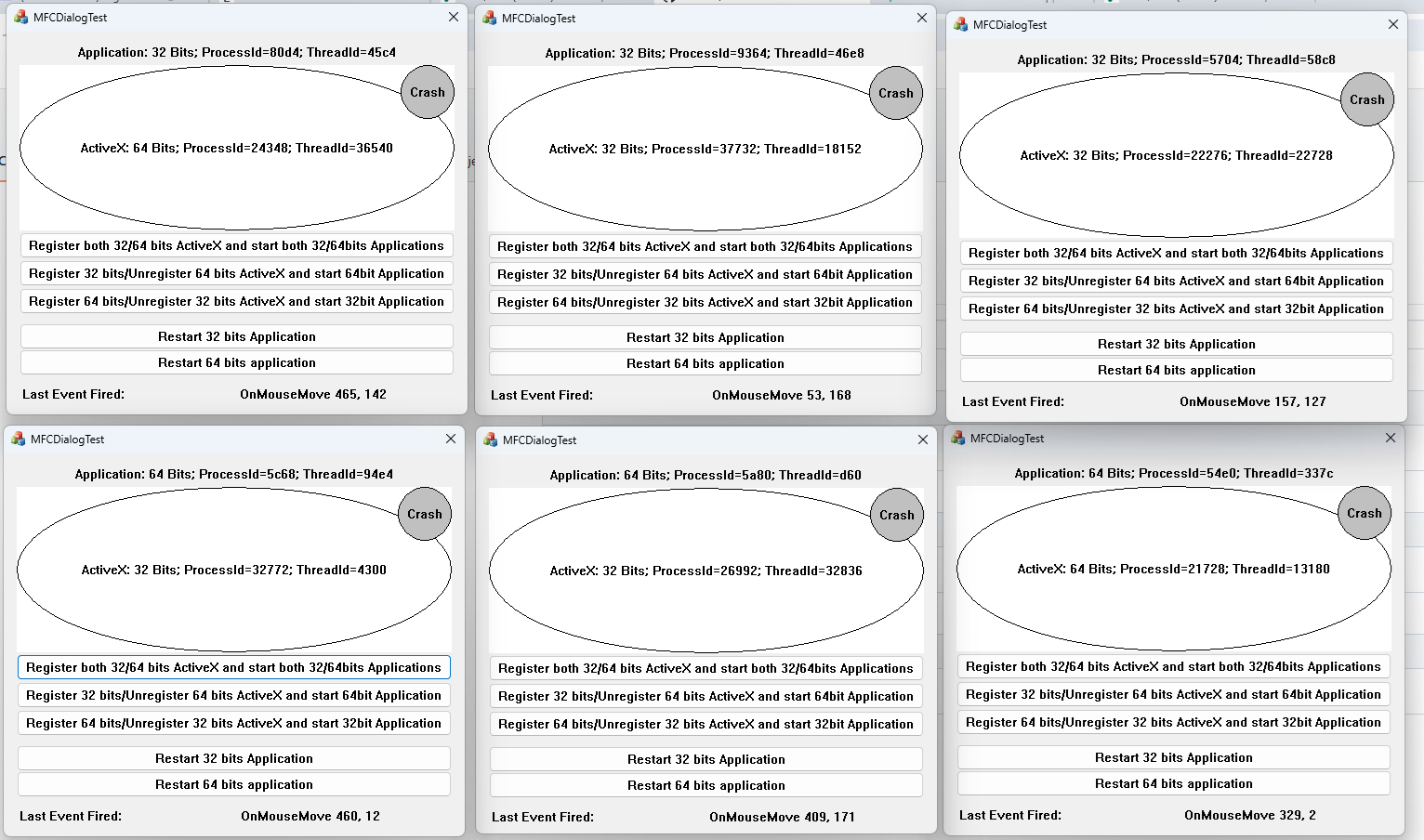
Below, you can see six MFCDialogTest applications running simultaneously, each displaying its build platform and Process ID. Hosted inside each application is an ActiveX control of the same or opposite build platform, displaying its own architecture (32 or 64 bits) as well as a distinctly different Process ID.
AXHook.h (The Interception & Hooking Engine)AxHostEnable) using injection techniques (via Detours integration) to hook API calls such as CoCreateInstance and redirect them to custom surrogate logic.AXHOST_32, AXHOST_64, AXHOST_MULTI, AXHOST_ALL) that dictate whether components run locally, across process boundaries, or shared within a single multi-use surrogate instance.AXHost.h (COM Server & Surrogate Management)IAXHostClassFactory, IGetClassObjectFactory).IClassFactory2 interface hack, utilizing CreateInstanceLic with an encoded BSTR key (L"{Target_CLSID}{PROCESID-MULTI-GET-...}") to pass parameters, Process IDs, and configuration flags across process boundaries without requiring custom RPC interfaces.OpenProcess), zombie prevention, and reference-count probing via structured exception handling (SEH).AXHostOleControlSite.h (MFC Container & Window Reparenting)CAXHostOccManager) and control site behaviors (CAXHostOleControlSite, MyOleClientSite, MyOleControlSite).HWND validity, and enforces the WS_CLIPCHILDREN window style to eliminate visual artifacts and drawing glitches during cross-process UI embedding.AXHost.cpp, AXHost_Server.cpp, AXHook.cpp)AXHost_Server): Acts as the external execution boundary that hosts third-party DLLs securely, ensuring that unhandled exceptions or fatal faults within legacy COM components cannot bring down the primary client application./automation) into command-line strings during dynamic loading sequences to satisfy legacy component startup expectations.The repository provides fully realized test harnesses across multiple languages and frameworks, proving the versatility of the architecture:
Samples/CPP/)Samples/C#/)AxHostNET wrapper library, leveraging dynamic typing (dynamic) to consume native components without needing explicit primary interop assemblies (PIAs).LoadLibrary / FreeLibrary) of the native hooking DLLs from a managed CLR execution context.Samples/VB/)Samples/MFC/ & AXHostWebBrowserTest)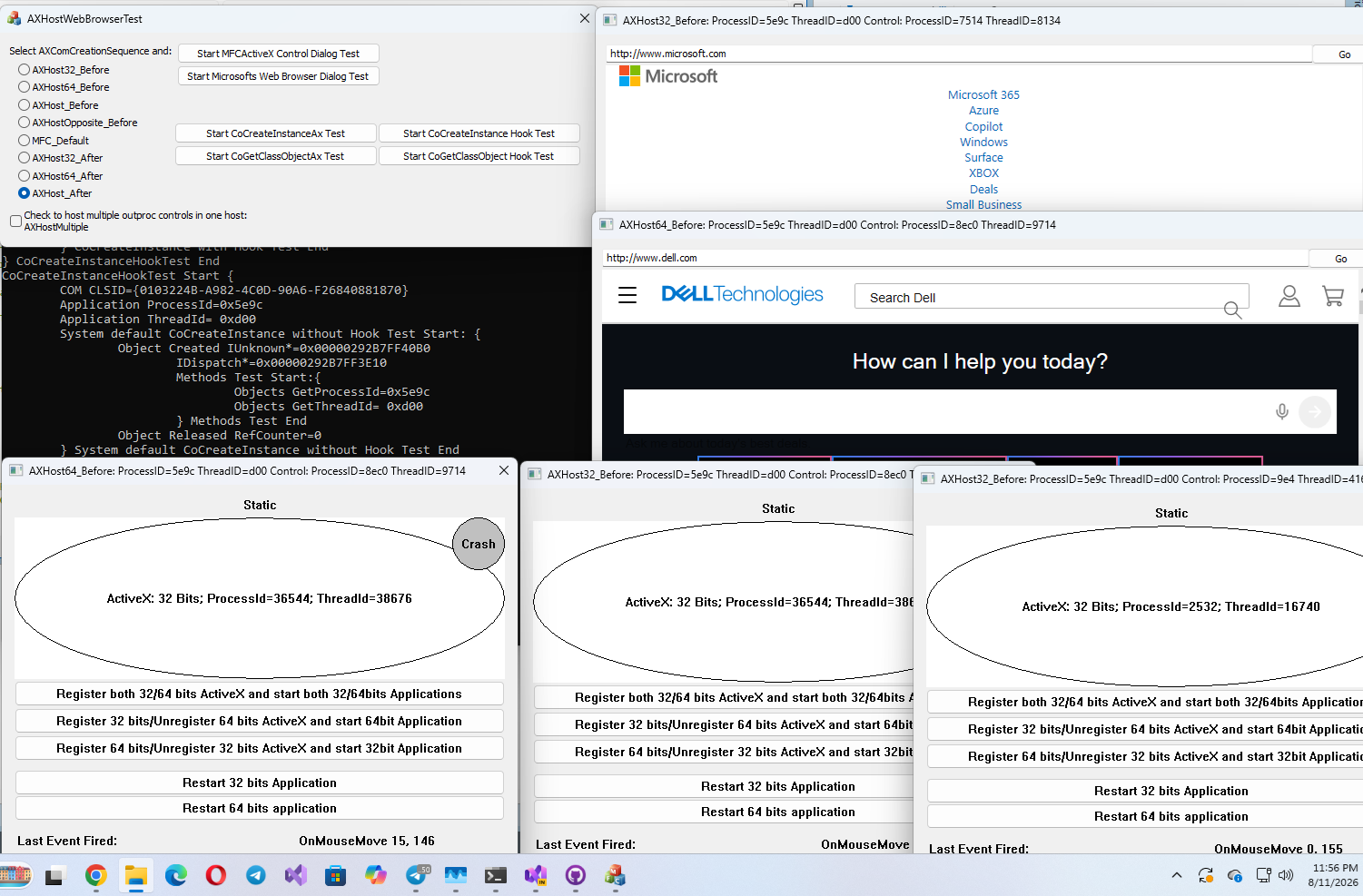
MFCApplication1 demonstrate the mandatory OLE initialization step (enabling custom control container and site overrides via AfxEnableControlContainer(&_AXHostOccManager);).Samples/AxRun Binaries/)